Index Plungers Knob Less Type, Stainless Steel
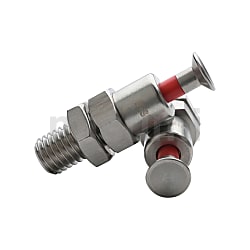
Brand :
MISUMI
Caution
Product Description
Dimensional drawing of Indexing Plungers

Specification table of Indexing Plungers
| form | pitch | D | D 1 | D 2 | D 3 | S | B | L | L 1 | L 2 | L 3 | S 1 | Sw 1 | Sw 2 | R | Allowable load (N) | Torque (N) max. | ||
| Type | M | plain screw | min. | max. | |||||||||||||||
E-SPMXPB | 10 | 1.5 | 12 | 16.1 | 18 | 12 | 5 | 5 | 47.5 | 18 | 7 | 24.5 | 5 | 6.5 | 17 | 3 | 6 | 24 | 15 |
| 12 | 1.75 | 12 | 19 | 20 | 14 | 6 | 6 | 12 | 20 | 7 | 26.5 | 6 | 7.5 | 19 | 2.5 | 7 | 15 | 55 | |
| 16 | 2 | 15 | 24.3 | 27 | 18 | 8 | 8 | 16 | 25 | 8 | 34.5 | 8 | 11 | 24 | 3.5 | 11 | 24 | 175 | |
| kgf=N×0.101972 | |||||||||||||||||||
Specification overview of Indexing Plungers
| form | screw thread | knob | axis | main body | pin | spring | nut |
 texture texture | texture | texture | texture | texture | texture | ||
| E-SPMXPB | plain screw | SUS303 | Polyacetal (red) | SUS303 | SUS303 | SUS304 | SUS304 |
Product Overview of Indexing Plungers
♢ Indexing Plungers, Simply and quickly position and secure the machine element parts of the workpiece by operating the knob to pull out or insert pins.
♢ Applies to various situations such as jig division, positioning, and stopping position restrictions.
♢ Applies to various situations such as jig division, positioning, and stopping position restrictions.
Product Features of Indexing Plungers
♢ Indexing Plungers, The economical knob plunger can be purchased at an economical price compared to existing MISUMI standard products.
♢ This series is a stainless steel type with a general screw type and can be operated with just one finger, greatly reducing the work space above the knob.
♢ When you press the knob, the pin turns ON (black button), and when you press it again, it returns to OFF state (black and white buttons).
♢ This series is a stainless steel type with a general screw type and can be operated with just one finger, greatly reducing the work space above the knob.
♢ When you press the knob, the pin turns ON (black button), and when you press it again, it returns to OFF state (black and white buttons).
How to Use of Indexing Plungers
How to operate return type and rest position type
• Return type of Indexing Plungers
1. The front part is generally protruding.
2. The front part crawls when the knob is pulled.
3. When the knob is released, the front part returns to its protruding state due to the built-in elastic force.
• Return type of Indexing Plungers
1. The front part is generally protruding.
2. The front part crawls when the knob is pulled.
3. When the knob is released, the front part returns to its protruding state due to the built-in elastic force.

• Rest position type of Indexing Plungers
1. The front part is generally protruding.
2. The front part crawls when the knob is pulled.
3. If it is rotated 90° in the pulled state, the front part can be fixed in the crawled state.
4. To unlock, simply rotate 90° from the pulled position.
5. When the knob is released, the front part regains its protruding state due to the action of built-in elastic force.
1. The front part is generally protruding.
2. The front part crawls when the knob is pulled.
3. If it is rotated 90° in the pulled state, the front part can be fixed in the crawled state.
4. To unlock, simply rotate 90° from the pulled position.
5. When the knob is released, the front part regains its protruding state due to the action of built-in elastic force.

Use cases of Indexing Plungers

Specification
| Part No | Thread | D | D1 | D2 | D3 | S | B | L | L1 | L2 | L3 | S1 | Sw1 | Sw2 | R | Load(N) | Torque(N) max. | ||
| Type | M | Coarse | min. | max. | |||||||||||||||
| E-SPMXPB | 10 | 1.5 | 12 | 16.1 | 18 | 12 | 5 | 5 | 47.5 | 18 | 7 | 24.5 | 5 | 6.5 | 17 | 3 | 6 | 24 | 15 |
| 12 | 1.75 | 12 | 19 | 20 | 14 | 6 | 6 | 12 | 20 | 7 | 26.5 | 6 | 7.5 | 19 | 2.5 | 7 | 15 | 55 | |
| 16 | 2 | 15 | 24.3 | 27 | 18 | 8 | 8 | 16 | 25 | 8 | 34.5 | 8 | 11 | 24 | 3.5 | 11 | 24 | 175 | |
| kgf=N×0.101972 | |||||||||||||||||||
Usage method
Operation methods of "Reset type" and "Self-locking type"
•Reset type
1 The front end is usually in a protruding state.
2 The front end retracts when the knob is pulled out.
3 If you release the knob, the front end will return to the protruding state due to the force of the built-in spring.
Operation methods of "Reset type" and "Self-locking type"
•Reset type
1 The front end is usually in a protruding state.
2 The front end retracts when the knob is pulled out.
3 If you release the knob, the front end will return to the protruding state due to the force of the built-in spring.
Operation methods of reset type and self-locking type•Reset type1 The front end is usually in a protruding state.2The front end retracts when the knob is pulled out.3If you release the knob, the front end will return to the protruding state due to the force of the built-in spring.
Reset type


•Self-locking type
1 The front end is usually in a protruding state.
2 The front end retracts when the knob is pulled out.
3 If you rotate it 90° while keeping it pulled out, the retracted state of the front end can be locked.
4. When unlocking, just rotate it 90° while keeping it pulled out.
5. If the knob is released, the front end will return to the protruding state due to the force of the built-in spring.
1 The front end is usually in a protruding state.
2 The front end retracts when the knob is pulled out.
3 If you rotate it 90° while keeping it pulled out, the retracted state of the front end can be locked.
4. When unlocking, just rotate it 90° while keeping it pulled out.
5. If the knob is released, the front end will return to the protruding state due to the force of the built-in spring.
Self-locking type

Usage example
