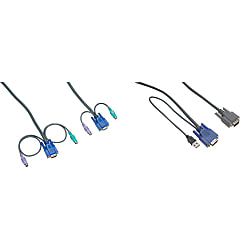
USB / PS/2 Connection Cable Dedicated for KVM (KVM* Series)
Brand :
MISUMI
Caution
Product Description
[Features]·High shielding effect and stable operation [Application] · Dedicated cable for stable KVM switch operation

A dedicated cable that allows stable operation of KVM switch
● A dedicated cable with high shield effect that allows stable operation of KVM switch (KVMM*) and KVMIO-104U-R.

• Appearance and specifications are subject to change without notice.
CBLKV-CBM102T-R has sold out. There are no substitute products available.
Specification Table
| Model | Overall Length | Cable Type (PC main body connection port) |
| CBLKV-CBM180T-R | 1.8 m | VGA (Male) PS/2 Mouse (Male) & Keyboard (Male) Inch Screw |
| CBLKV-CBM300T-R | 3 m | |
| CBLKV-CBM600T-R | 6 m | |
| CBLKV-CBM102T-R | 10 m | |
| CBLKV-CBD180UH-R | 1.8 m | USB Mouse & Keyboard |
| CBLKV-CBD300UH-R | 3 m | |
| CBLKV-CBD500UH-R | 5 m | |
| CBLKV-CBD300H-R | 3 m | PS/2 Mouse & Keyboard |
| CBLKV-CBD600H-R | 6 m | |
| CBLKV-CBD102H-R | 10 m |
Usage
(1) Directly connect the KVM switch to the PC main body connection cable.
(2) Connect the PS/2 conversion adapter for console extension (KVADP-CVI-M6F6F2-R) below in between the KVM switch to console (keyboard/mouse) extension connection cable and the keyboard/mouse cable.